Building Your First Claude Managed Agent
A hands-on Python walkthrough of Anthropic's Managed Agents: build a single review agent, then promote it into a coordinator that delegates to a reviewer and a test-writer subagent.
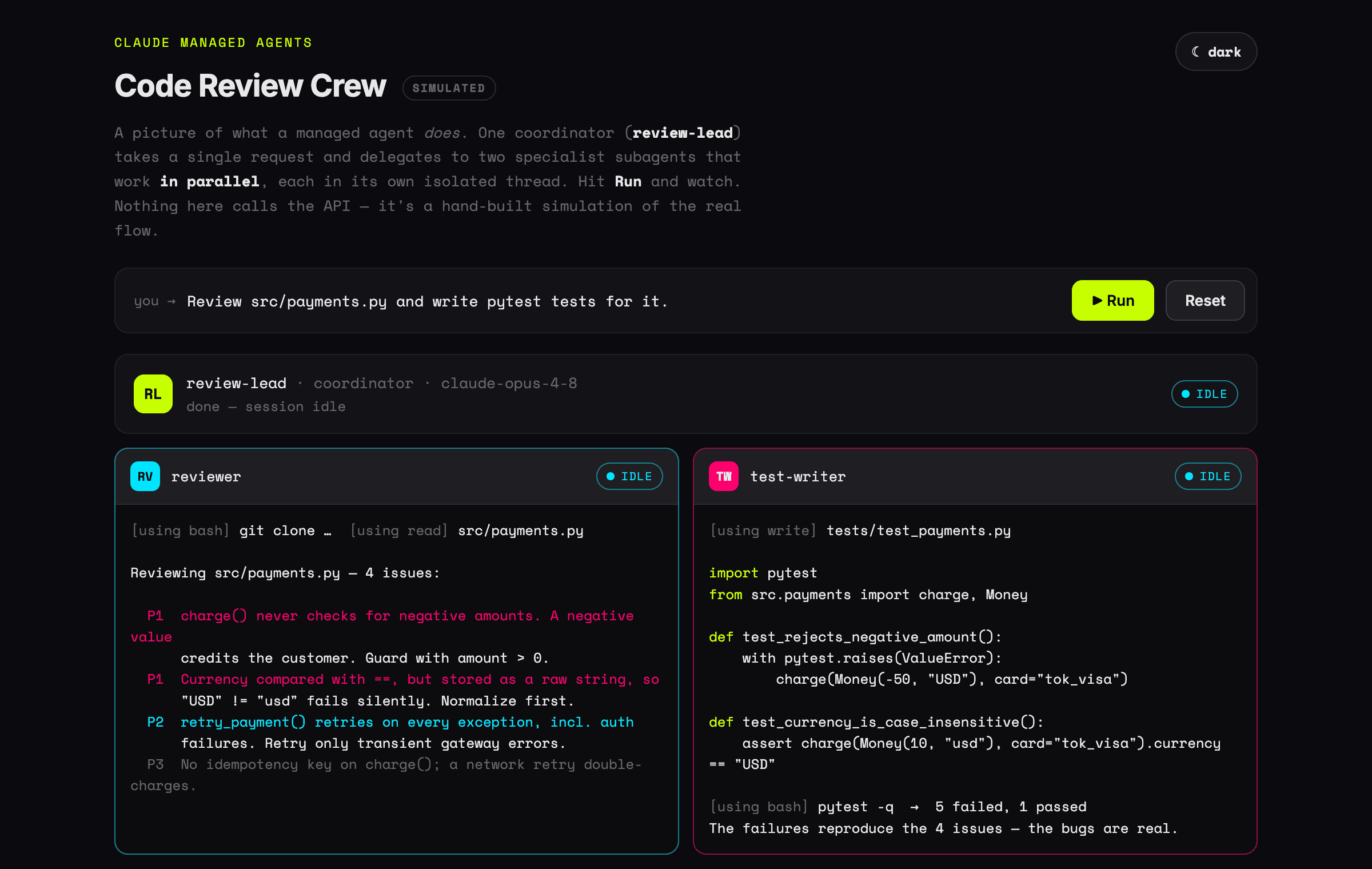
First time hearing “managed agent”? Start here. Imagine you hire a very capable assistant who can use a computer — type commands, open and edit files, search the web. Normally you'd have to sit next to them and approve every single click. A managed agent is that assistant, except Anthropic hands them their own computer, lets them work through a whole task on their own, and does all the sitting-next-to-them for you. You give one instruction — — walk away, and come back to a finished result.
That's the whole idea: you describe the goal, the agent does the steps. No babysitting, no wiring. The rest of this page shows how that works and how to build one yourself.
There are two ways to build with Claude. The Messages API hands you the raw model and you write the agent loop yourself — call the model, parse its tool calls, run the tools, feed the results back, repeat. Managed Agents is the other way: Anthropic runs that loop for you inside a hosted cloud sandbox that already has a shell, file tools, and web access wired in.
In other words, "managed" means Anthropic manages the runtime — the agent loop, the sandbox, prompt caching, compaction, and state — so you only define what the agent is and hand it tasks. It is built for long-running, autonomous, asynchronous work.
To keep this concrete, we'll build one thing end to end: a code-review crew. First a single agent that reviews a file. Then we promote it into a coordinator that delegates the review to one subagent and test-writing to another, then synthesizes both for you. Want to see it move first? Open the interactive demo — then come back for the how.
Managed Agents is in beta — every request needs the managed-agents-2026-04-01 header, which the SDK sets automatically. The Python below is sourced from Anthropic's docs and is illustrative; running it needs your own API key with Managed Agents access.Agent
The reusable config: model, system prompt, tools, MCP servers, and skills. Create it once, reference it by id.
Environment
Where sessions run — an Anthropic-managed cloud sandbox (or self-hosted) with bash, files, and the web.
Session
A running instance of an agent doing one task, with a persistent filesystem and conversation history.
Events
The stream in and out: you send a user message, the agent streams back its thinking, tool use, and results.
Prerequisites
You need an Anthropic API key. Install the SDK and export the key — that's the whole setup; the sandbox itself is provisioned for you.
pip install anthropic
export ANTHROPIC_API_KEY="sk-ant-..."
Step 1 — Your first agent: the reviewer
Every Managed Agent follows the same four-step shape: create an Agent, create an Environment, start a Session, then stream Events. Here's a single reviewer agent doing exactly that.
from anthropic import Anthropic

client = Anthropic()  # reads ANTHROPIC_API_KEY

# 1. Define the agent — model, instructions, and the built-in toolset
reviewer = client.beta.agents.create(
    name="reviewer",
    model="claude-opus-4-8",
    system=(
        "You are a meticulous senior code reviewer. Read the file you are "
        "given, then report bugs, risky edge cases, and style issues as a "
        "short, prioritized list."
    ),
    tools=[{"type": "agent_toolset_20260401"}],
)

# 2. Define where it runs — an Anthropic-managed cloud sandbox
environment = client.beta.environments.create(
    name="code-review-env",
    config={"type": "cloud", "networking": {"type": "unrestricted"}},
)

# 3. Start a session that runs this agent in that environment
session = client.beta.sessions.create(
    agent=reviewer.id,
    environment_id=environment.id,
    title="Review payments.py",
)


# 4. Send a task and stream the agent working (reused in Step 2)
def run(session, prompt):
    with client.beta.sessions.events.stream(session.id) as stream:
        client.beta.sessions.events.send(
            session.id,
            events=[{
                "type": "user.message",
                "content": [{"type": "text", "text": prompt}],
            }],
        )
        for event in stream:
            if event.type == "agent.message":
                for block in event.content:
                    print(block.text, end="")
            elif event.type == "session.status_idle":
                break


run(session, "Clone https://github.com/acme/store, review src/payments.py, "
             "and list the bugs and edge cases you find.")
That's a complete agent. The agent_toolset_20260401 toolset gives it bash, file read/write/edit, glob/grep, plus web_search and web_fetch — so it can clone the repo, open the file, and reason about it without any loop code from you. It runs until it emits session.status_idle.
Step 2 — Add a teammate and promote a coordinator
One reviewer is useful. The payoff is delegation: keep the reviewer, add a test-writer specialist, and create a third agent — a coordinator — whose multiagent roster lists both. Now a single request fans out to both subagents in parallel and the coordinator synthesizes their results.
# The reviewer from Step 1 still exists. Add a second specialist:
test_writer = client.beta.agents.create(
    name="test-writer",
    model="claude-haiku-4-5",  # a cheaper model is fine for this job
    system=(
        "You write focused unit tests. Given a source file, write a pytest "
        "module covering the main paths and the tricky edge cases."
    ),
    tools=[{"type": "agent_toolset_20260401"}],
)

# Promote a coordinator that delegates to both specialists:
lead = client.beta.agents.create(
    name="review-lead",
    model="claude-opus-4-8",
    system=(
        "You lead code review. Delegate the review to the reviewer agent and "
        "test writing to the test-writer agent, then summarize both results "
        "for the author."
    ),
    tools=[{"type": "agent_toolset_20260401"}],
    multiagent={
        "type": "coordinator",
        "agents": [
            {"type": "agent", "id": reviewer.id},
            {"type": "agent", "id": test_writer.id},
        ],
    },
)

# One request → the lead fans out to both subagents, then synthesizes.
session = client.beta.sessions.create(
    agent=lead.id,
    environment_id=environment.id,
    title="Review + tests for payments.py",
)

run(session, "Review src/payments.py and write pytest tests for it.")
Each subagent runs in its own context-isolated thread but shares the same sandbox and filesystem, so the test-writer sees the same checkout the reviewer read. On the session stream you'll see thread events (session.thread_created, agent.thread_message_sent) as the lead delegates — see the multi-agent docs if you want to drill into each agent's reasoning.
What the crew gives you back
Rather than read a transcript, watch it run — the interactive demo animates the coordinator delegating to both subagents in parallel and synthesizing their results. In short: the reviewer returns a prioritized list of bugs, and the test-writer leaves a runnable file in the sandbox — for example:
# tests/test_payments.py  — written by the test-writer subagent
import pytest
from src.payments import charge, Money


def test_rejects_negative_amount():
    with pytest.raises(ValueError):
        charge(Money(-50, "USD"), card="tok_visa")


def test_currency_is_case_insensitive():
    result = charge(Money(10, "usd"), card="tok_visa")
    assert result.currency == "USD"


def test_happy_path_authorizes():
    result = charge(Money(10, "USD"), card="tok_visa")
    assert result.status == "succeeded"
That's the whole point of a managed agent: you describe the goal once and get back concrete artifacts — a prioritized review and a runnable test file — without writing an agent loop, running a sandbox, or wiring up tools yourself.
When to delegate — and the limits
Three delegation patterns the docs call out, mapped to our crew:
- Parallelization — fan out independent subtasks at once. Our reviewer and test-writer run in parallel.
- Specialization — route to focused agents with their own prompts and tools instead of one do-everything agent.
- Escalation — hand the hard part to a more capable model (note the lead and reviewer use Opus, the test-writer Haiku).
Worth knowing before you scale it up:
- A coordinator delegates one level deep — subagents can't spawn their own subagents.
- A roster holds at most 20 agents, though the coordinator can call multiple copies of each.
- A session runs at most 25 concurrent threads.
Where you'd actually use this
The code-review crew is one example, but the same shape — hand over a goal, let the agent work in a sandbox — fits a lot of everyday engineering work. A few places it earns its keep:
- Code review on every PR. An agent reads the diff, flags bugs and risky changes, and posts a summary — before a human even looks.
- Backfilling tests. Point it at an untested module; it writes the test file, runs the suite in the sandbox, and iterates until they pass.
- Dependency bumps & migrations. Upgrade a package, let the agent fix the breakages across the codebase and confirm the build is green — the slow, mechanical work you keep putting off.
- Bug triage from a stack trace. Give it the error and the repo; it reproduces the failure in the sandbox, traces the root cause, and proposes a fix.
- Docs that keep up. It reads the actual code and writes or refreshes the README, API docs, or changelog so they stop drifting from reality.
- Research & data chores. Web-search across sources into a cited brief, or fetch some data, write a script, and hand back a clean report.
- Scheduled, long-running jobs. Nightly audits, lint sweeps, or large refactors that run for minutes to hours without anyone watching — exactly what the managed runtime is built for.
Notice the pattern: each is a well-scoped goal that needs a real computer (run code, edit files, browse) and benefits from running unattended. That's the sweet spot.
Managed Agents or the Messages API?
A quick rule of thumb for the team:
- Reach for Managed Agents when the work is long-running or async, needs a real sandbox (run code, edit files, browse), or you'd rather not build and operate your own agent loop and tool runtime.
- Reach for the Messages API when you want fine-grained control over the loop, are doing a single request/response, or need features the beta doesn't cover yet.
Start with the Quickstart to create your first session, then the multi-agent guide to build a crew like this one.